Fence Panel Calculator
Enter the fence length and panel width to get the panels, posts and the size of the last panel.
The Fence Panel Calculator works out how many ready-made fence panels, posts and cut panels a fence run needs, based on the run length and the panel width you choose. It runs in your browser, is free, and needs no sign-up. Nothing you type is uploaded.
The tool handles straight runs, gates, several runs of the same fence, corners and closed loops. The result updates as you type, so you can compare panel widths or gate sizes before you order. Use the figures for planning and material lists. Your local building code and the panel manufacturer’s instructions decide post depth, spacing and openings.
How to use the Fence Panel Calculator
- Type the Length of the fence run, measured along the fence line from the centre of the first post to the centre of the last post.
- Enter the Panel width. Pick 6 ft, 8 ft, 1.8 m or 2.4 m from the presets, or type your own size. Check the size against your product.
- Enter the Post width. Use 0 if the panels butt together.
- Set Number of gates and Gate width. The gate width is the clear width of one opening.
- If the fence has more than one run, type the other lengths in More runs, separated by commas, spaces or new lines.
- Choose How the runs connect: joined at the corners, a closed loop, or separate runs. If you typed only one length, set Corners to split it into equal sides.
- Optional: enter your manufacturer’s limit in Maximum post spacing (optional) to get a warning if the spacing is too wide.
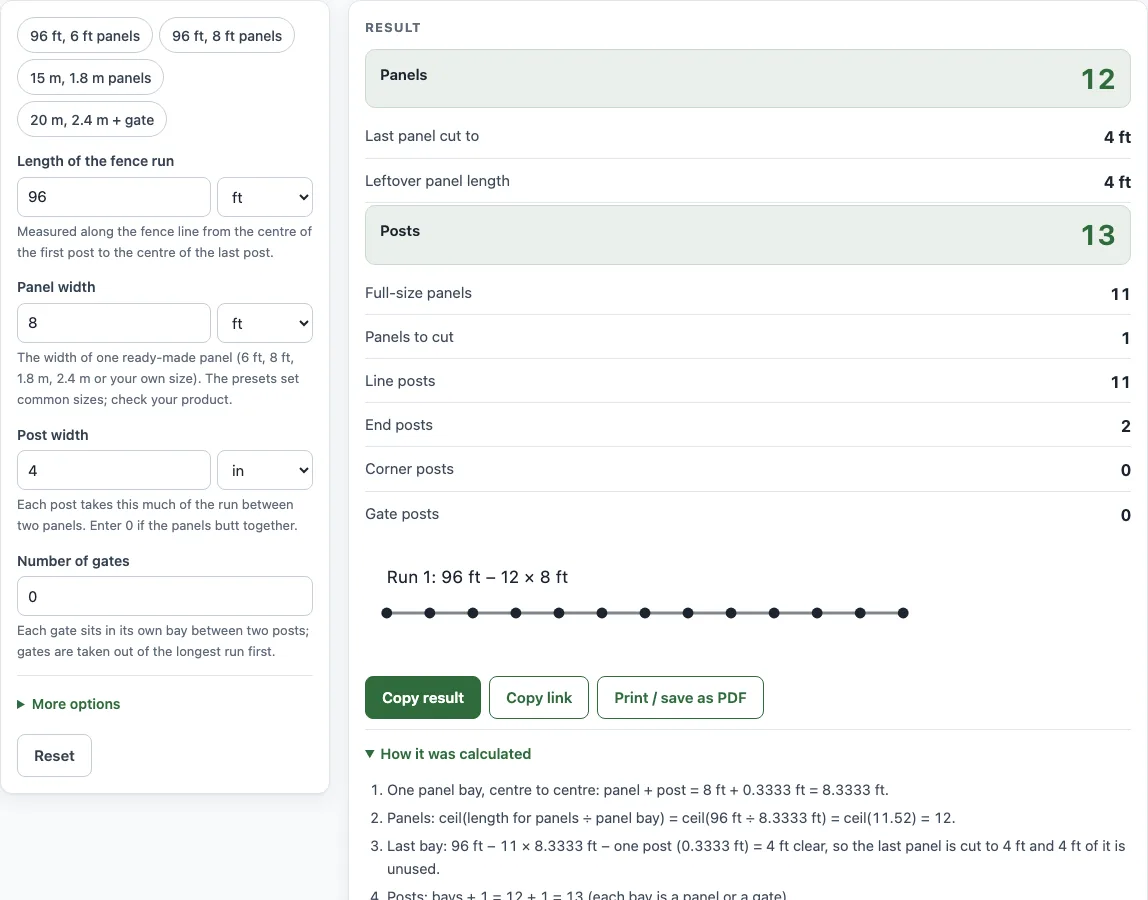
- Read the result lines: Panels, Last panel cut to, Leftover panel length, Posts, Full-size panels, Panels to cut, Line posts, End posts, Corner posts and Gate posts. Open How it was calculated to see each step with your own numbers.
Example buttons at the top of the form fill in a realistic case, and Reset returns to the starting example. Some fields are under More options.
How many fence panels do I need?
Divide the run length, minus the gate openings, by the panel width plus the post width, then round up. Rounding up is needed because a partial bay still needs a whole panel.
Panels = ceil((fence length − gates) ÷ (panel width + post width))
Each panel and the post beside it take one pitch along the run.
How are fence posts counted?
A straight run needs one more post than it has panels, because each panel sits between two posts. Corners and gates add posts. Line posts stand between panels, end posts sit at the two ends, and each corner post is counted once.
What happens to the last panel?
The run rarely divides evenly, so the last panel is often cut. Take a 96 ft run (1,152 in) with 8 ft panels (96 in) and 4 in posts. Each panel plus one post is 100 in centre to centre. Eleven full panels use 1,100 in, which leaves 52 in. The last post takes 4 in of that, so the 12th panel is cut to 48 in (4 ft). The total is 12 panels and 13 posts.
Why do gates reduce the number of panels?
Each gate sits in its own bay between two posts, so the gate width is taken out of the run before panels are counted. The tool takes gates out of the longest run first. If the gates together are as wide as or wider than the run they sit in, no panels fit, and the tool shows an error.
Which panel widths are common?
6 ft and 8 ft are common in the US. 1.8 m (6 ft) is common in the UK, and 2.4 m is used in some markets. Presets cover these sizes, but your product may differ, so check its exact panel width before you order.
Sources
- Panel and post counts are geometry on the sizes you enter (panel bay = panel width + post width).
- Unit factors are exact NIST values (SP 811, Appendix B).
Worked examples
| Input | Result |
|---|---|
| 96 ft, 8 ft panels, 4 in posts | 12 panels, 13 posts, last panel cut to 4 ft |
| 96 ft, 8 ft panels, 4 in posts | 11 panels, 13 posts |
| 20 m, 2.4 m panels, 10 cm posts | 8 panels, 9 posts |
| 15 m, 1.8 m panels, 10 cm posts | 8 panels, 9 posts, last panel cut to 1.6 m |
| 20, 30, 20 ft, 6 ft panels, 4 in posts | 13 panels, 14 posts |
Calculated by the tool above with these values.
Frequently asked questions
Is the fence panel calculator free to use?
Yes. It runs in your browser, is free, and needs no sign-up. Nothing you type is uploaded.
Can I use the results in a quote or material list?
Yes. The results may be used in commercial work such as quotes, material lists and job sheets, with no attribution needed. They are estimates, so check them against your product’s specifications.
Can the fence panel calculator handle a fence that runs up a slope?
Panels on sloping ground are either racked, following the slope, or stepped, staying level and stepping down at each post. Choose the method your product and its manufacturer’s instructions allow.
Can I work out a fence made of several runs?
Yes. Type the other run lengths in More runs, then choose how the runs connect. Each run is counted on its own, so cut panels are not shared between runs.
Does a result show that my fence meets local code?
No. Results are planning estimates. Local building codes and the manufacturer’s instructions decide post depth, spacing, railing height and openings.
Should I order spare panels?
It is wise to order a spare panel or two for cuts and damage, especially when the last panel must be cut to size or the fence follows a slope.
Related tools
- Fence cost calculator — the materials list and total cost with your local prices.
- Fence post spacing calculator — the number of posts and an equal spacing.
- Fence picket calculator — pickets, gaps and rails for a picket or privacy fence.
- Chain link fence calculator — the full chain link materials list.
- Fence post depth calculator — how deep to set posts and the post length to buy.
- Fence post concrete calculator — concrete bags per post hole.
- Pool fence calculator — fence length around a pool, panels, posts and CPSC barrier checks.
- Linear feet fence calculator — the fence line of your yard in feet, yards and metres.