Fence Picket Calculator
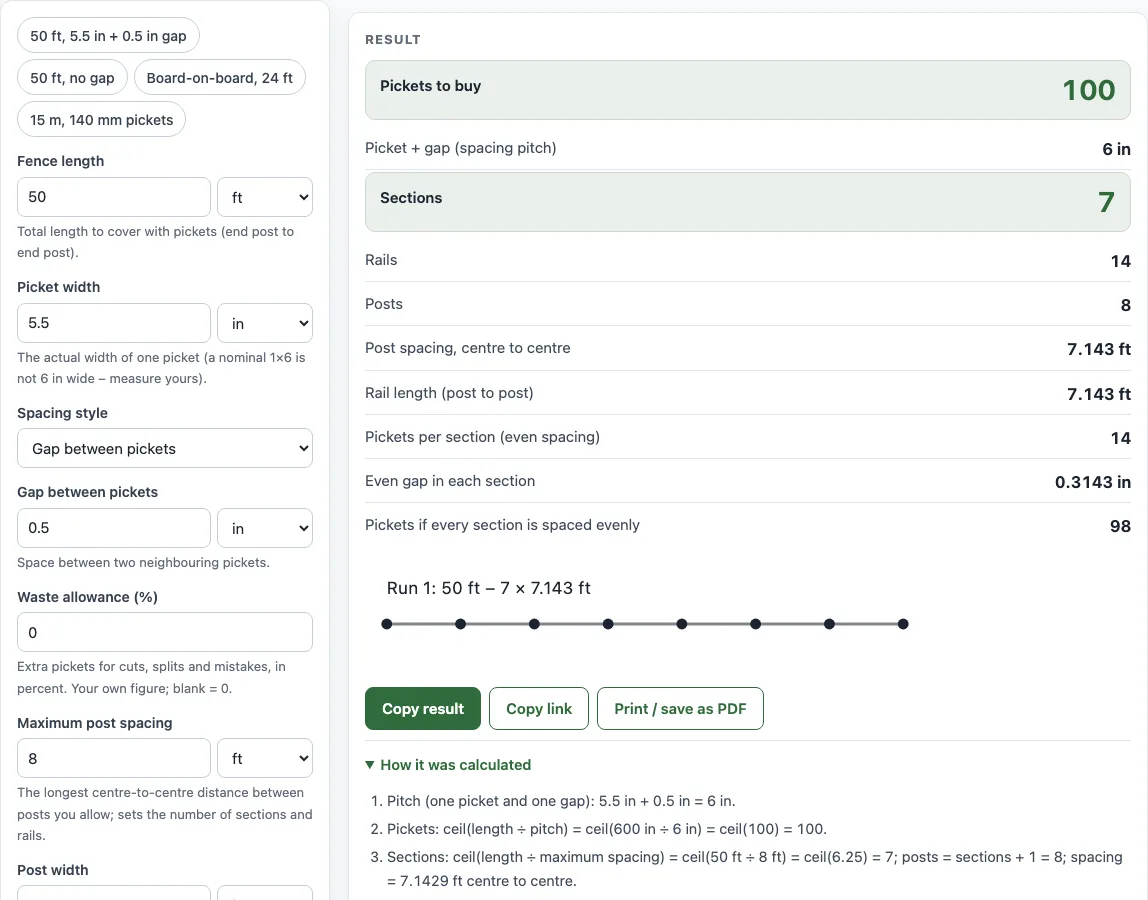
Enter the fence length, picket width and gap to get the number of pickets and rails.
How to use the Fence Picket Calculator
- Enter the Fence length, measured from end post to end post.
- Enter the Picket width of one board. A nominal 1×6 is not 6 in wide, so measure yours.
- Choose a Spacing style: Gap between pickets, No gap (pickets touching), or Board-on-board (overlapping).
- If you chose Gap between pickets, enter the Gap between pickets. If you chose Board-on-board, enter the Overlap on each side.
- Enter a Waste allowance (%) for cuts, splits and mistakes. Leave it blank for 0.
- Open More options to check the Maximum post spacing, Post width, Rails per section and Faces with pickets.
- Read Pickets to buy first, then check the spacing pitch, sections, rails and posts.
The four example buttons at the top of the form fill in realistic cases, such as 50 ft with a 0.5 in gap or a 24 ft board-on-board run. The Reset button restores the starting example. Under the result, Copy result copies the figures, and Copy link saves a page address that keeps all your inputs, so opening it shows the same result. Print / save as PDF prints your inputs, the result, the calculation steps and the date.
Add a waste percentage for split or warped boards, and set the post spacing to see how many sections and rails you need. Print / save as PDF gives a dated list to take to the lumber yard.
How to calculate picket spacing for a fence
Picket spacing is the distance from the start of one picket to the start of the next. This is called the spacing pitch, and it equals picket width plus gap. For 5.5 in pickets with a 0.5 in gap, the pitch is 6 in.
For board-on-board, the front boards overlap their neighbours, so the back boards are spaced at picket width − 2 × overlap. For 5.5 in pickets with a 1.5 in overlap, the back boards sit 2.5 in apart. Each front board can overlap by at most half its width. More than that would leave the back boards touching.
To space pickets evenly within one section, first choose how many pickets fit. Then divide the leftover space into equal gaps. Use the clear opening between posts, which is the post spacing minus the post width. The gap is (section width − pickets × picket width) ÷ (pickets + 1) when you leave a gap at both posts. If one end is closed against a post, divide by the number of pickets instead. If a picket is wider than the clear opening, the tool warns you.
How to calculate fence boards
The number of pickets is the fence length divided by the pitch, rounded up. Fence length ÷ (picket width + gap) gives the count before waste. A 50 ft fence is 600 in. With 5.5 in pickets and 0.5 in gaps, 600 ÷ 6 = 100 pickets.
With no gap, the count is simply fence length ÷ picket width. A privacy fence normally uses this method.
Board-on-board fences overlap pickets on both sides of the rails, so they need more boards than a single-face fence of the same length. The tool counts these for you when you choose Board-on-board.
Next, add waste. If you enter 5% for waste, the tool adds about 5% more pickets to the count before waste. Rounding up keeps the total at or above the count you need.
Rails are set per section between posts. Enter the number of rails your fence design uses; because the manufacturer’s instructions and local rules may differ.
Sources
- American Softwood Lumber Standard PS 20 (NIST) — dressed sizes of nominal lumber (4×4 = 3½ × 3½ in, 2×2 = 1½ × 1½ in, 1×6 ≈ 5½ in wide).
- Picket layout is geometry on the sizes you enter (pitch = width + gap).
Worked examples
| Input | Result |
|---|---|
| 50 ft, 5.5 in pickets, Gap between pickets | 100 pickets, 7 sections, 14 rails |
| 100 ft, 3.5 in pickets, Gap between pickets | 264 pickets, 13 sections, 26 rails |
| 15 m, 140 mm pickets, Gap between pickets | 100 pickets, 7 sections, 14 rails |
| 30 ft, 5.5 in pickets, No gap (pickets touching) | 66 pickets, 4 sections, 8 rails |
| 24 ft, 5.5 in pickets, Board-on-board (overlapping) | 64 pickets, 3 sections, 9 rails |
Calculated by the tool above with these values.
Frequently asked questions
Which spacing style should I pick for a privacy fence?
A privacy fence normally has no gaps, so choose No gap (pickets touching). The count is then fence length ÷ picket width. If the boards are not touching in your design, use Gap between pickets instead.
Why does the tool warn that the gap is 0?
A gap of 0 means the pickets touch. If that is what you want, choose No gap for that spacing. If you want some space, enter a small gap so the boards can swell and dry without binding.
Why is my picket width not 6 inches?
A nominal 1×6 is usually about 5.5 in wide, so the labelled size and the real size differ. Measure one board and enter that figure, because the count depends on the real width.
Does a result mean my fence meets the building code?
No. Results are estimates for planning and ordering. Local building codes and the manufacturer’s instructions decide post depth, spacing, railing height and openings.
Is anything I type sent to a server?
No. The tool runs in your browser, and nothing you type is uploaded. It is free and needs no sign-up.
Can I use the results in a quote or job sheet?
Yes. Results may be used in commercial work, such as quotes, material lists and job sheets, with no attribution required.
Related tools
- Fence cost calculator — the materials list and total cost with your local prices.
- Fence post spacing calculator — the number of posts and an equal spacing.
- Fence panel calculator — panels, posts and the cut size of the last panel.
- Chain link fence calculator — the full chain link materials list.
- Fence post depth calculator — how deep to set posts and the post length to buy.
- Fence post concrete calculator — concrete bags per post hole.