Fence Post Spacing Calculator
Enter the run length and the maximum spacing to get the number of posts and an even spacing.
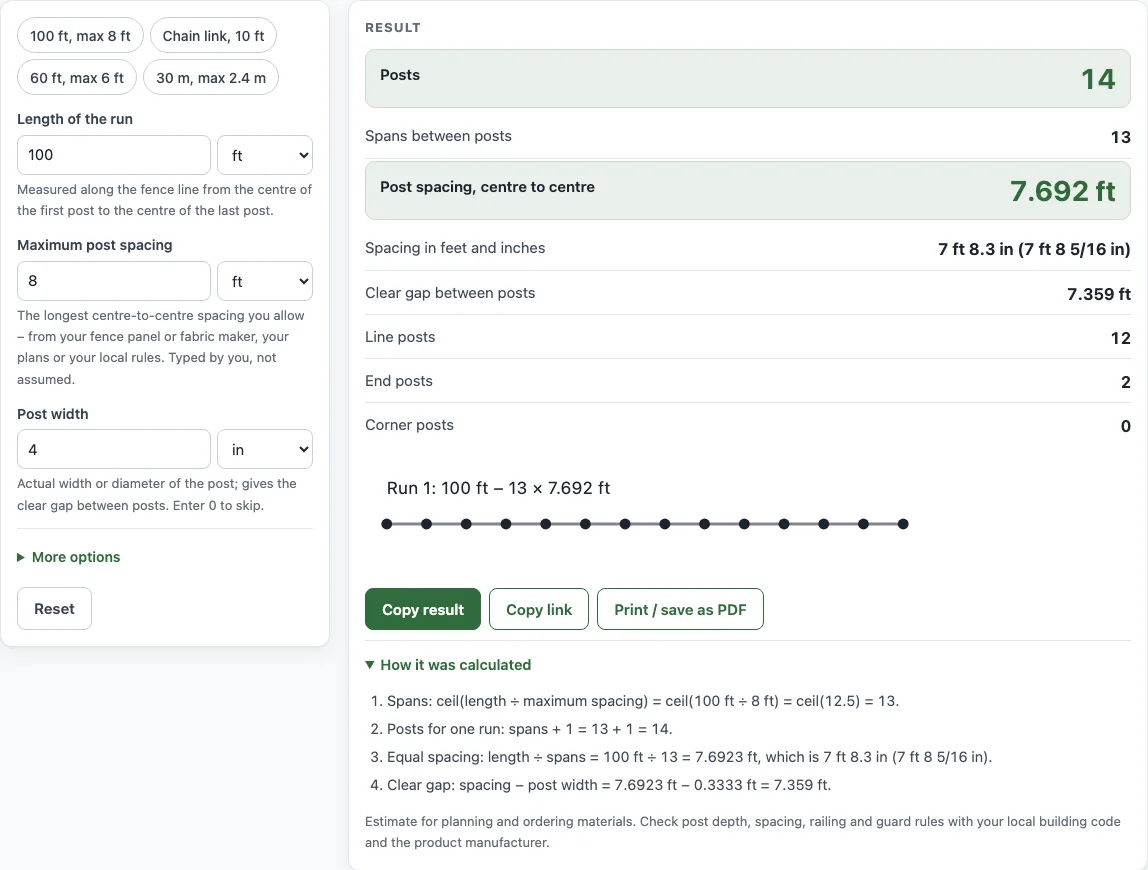
How to use the Fence Post Spacing Calculator
- Type the length of your fence into Length of the run. Measure along the fence line, from the centre of the first post to the centre of the last post.
- Enter your Maximum post spacing, the longest centre-to-centre distance you allow. Take it from your fence panel or fabric maker, your plans, or your local rules. The tool does not assume a value for you.
- Enter the Post width (the actual width or diameter of the post). This sets the clear gap between posts. Enter 0 to skip it.
- If your fence has more than one run, type the other run lengths into More runs, separated by commas, spaces or new lines. Then choose an option under How the runs connect. If you cannot see these fields, check under More options.
- Read the result as you type. Check Posts, Spans between posts, Post spacing, centre to centre, Spacing in feet and inches, Clear gap between posts, and the line, end and corner post counts.
The example buttons at the top of the form fill in a realistic case, such as 100 ft, max 8 ft, so you can see how a result is built. Reset restores the starting example. Under the result, Copy result copies the figures, Copy link keeps all your inputs in the page address, and Print / save as PDF prints the inputs, result, calculation steps and date.
How is fence post spacing calculated?
The number of spans is the run length divided by the maximum spacing, rounded up to the next whole number. A span is the gap between two neighbouring posts. For a straight run with a post at each end, the number of posts is the number of spans plus one. For example, a 100 ft run with posts no more than 8 ft apart gives 100 ÷ 8 = 12.5, which rounds up to 13 spans and 14 posts.
Rounding up keeps every span within your maximum. The tool then divides the run evenly across those spans: 100 ÷ 13 = 7.69 ft, or 7 ft 8.3 in, centre to centre. Equal spacing looks better and spreads the load evenly. It also avoids a short last span, which can happen if you simply place posts at the maximum distance until the run runs out.
How do corners and multiple runs change the post count?
Each run is worked out in the same way, and then the posts are combined. Corner posts are shared by two runs, so the tool counts each one once. Choose Joined at the corners for one continuous fence, Closed loop for a full enclosure, or Separate runs when each run has its own end posts. Gate posts are extra posts, added on each side of a gate.
The clear gap is the open space between posts, not the distance from centre to centre. It is found by subtracting the post width from the centre spacing. A 7.69 ft spacing with a post 0.33 ft (4 in) wide leaves a clear gap of about 7.36 ft.
If the post width is equal to or larger than the spacing, there is no room between posts, and the tool shows an error asking you to check both numbers. If a run is not longer than your maximum spacing, the tool shows a warning, because that run needs only one span and two posts.
Sources
- Hawaii state specification 32 31 13, Chain Link Fences and Gates — line posts at intervals not exceeding 10 ft.
- Spacing = run ÷ ceil(run ÷ your maximum) — geometry, no code limit is built in.
Worked examples
| Input | Result |
|---|---|
| 100 ft, maximum spacing 8 ft | 14 posts, 13 spans, 7.692 ft apart |
| 50 ft, maximum spacing 10 ft | 6 posts, 5 spans, 10 ft apart |
| 30 m, maximum spacing 2.4 m | 14 posts, 13 spans, 2.308 m apart |
| 20, 30, 20 ft, maximum spacing 10 ft | 8 posts, 7 spans, 10 ft apart |
| 10, 10, 10, 10 ft, maximum spacing 8 ft | 8 posts, 8 spans, 5 ft apart |
Calculated by the tool above with these values.
Frequently asked questions
What is a typical fence post spacing?
There is no single rule. For wood fences the rail length sets the limit: 8 ft rails reach at most 8 ft centre to centre. Chain link specifications commonly cap line posts at 10 ft, for example the Hawaii state specification section 32 31 13. Panel fences follow the width of the panel. These are layouts, not code, and your panel or fence maker’s instructions decide the actual spacing.
Does this calculator check my local building code?
No. The results are estimates for planning and ordering. Local building codes and the manufacturer’s instructions decide post depth, spacing, railing height and openings, so check them before you build.
Why does the result show equal spacing instead of posts at the maximum distance?
Equal spacing spreads the load evenly and avoids a short last span. The tool always rounds the number of spans up, so no span goes over your maximum.
What is the difference between centre spacing and clear gap?
Centre spacing is the distance from the middle of one post to the middle of the next. The clear gap is the open space between the two posts, which is the centre spacing minus the post width.
Is my fence data uploaded anywhere?
No. The calculator runs in your browser, and nothing you type is uploaded. It is free and needs no sign-up.
Does this tool space pickets as well as posts?
This tool spaces posts. For the spacing of the pickets themselves, use the Fence Picket Calculator listed below.
Related tools
- Fence cost calculator — the materials list and total cost with your local prices.
- Fence picket calculator — pickets, gaps and rails for a picket or privacy fence.
- Fence panel calculator — panels, posts and the cut size of the last panel.
- Chain link fence calculator — the full chain link materials list.
- Fence post depth calculator — how deep to set posts and the post length to buy.
- Fence post concrete calculator — concrete bags per post hole.
- Linear feet fence calculator — the fence line of your yard in feet, yards and metres.
- Deck post spacing calculator — posts, equal spacing and beam lines for a deck.
- Gate brace calculator — diagonal brace length, angle and saw cuts for a gate.
- Bollard spacing calculator — bollard count, clear gap and centre spacing for an opening.